



Do you have a WordPress Blog ? and Without ANY BACKUP !!!
This post is for you.
Yea, you can backup your wordpress / non-wordpress website to Amazon S3 with a FREE account on the website www.codeguard.com
How to Setup
SignUp for a free account which Offers 2 GB space on www.codeguard.com
– Select the Website type, ie WordPress or Non-Wordpress.
– For wordpress, Install the plugin and copy paste the KEY to your wordpress codeguard settings.
– The Wordpress plugin installation will backup all your website Code and MySQL database.
– Once the Key is set, It will start the backup process. As per the site it will take less than 72 hrs to complete the First Full backup.
– You can set the interval to check the website for changes, say daily, weekly etc.
– Once Codeguard detects any changes in your site, It will sent you a notification mail to verify its by you or a hacker.
– Confirm the change, Then CodeGuard will backup that change to.
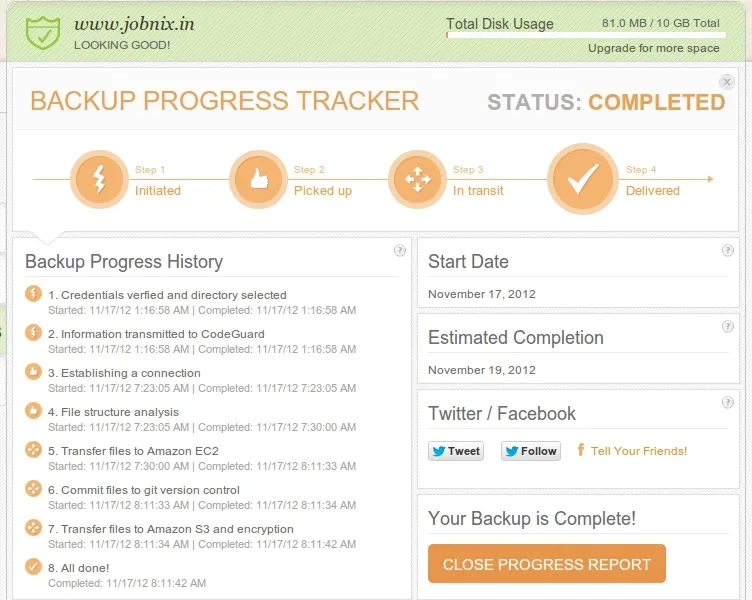
Four main steps of the initial backups,
(i) Process initiation
Process initiation contains verifying the credentials and transmitting them to CodeGuard.
(ii) File pick up
File pick up begins with an analysis of the file structure and creation of a git repository within Amazon’s Elastic Compute Cloud (EC2).
(iii) File transit
The transit process begins after the file structure has been analyzed and the list of the files to be transmitted is finalized.
Files are then transferred to EC2.
After all files are transferred to EC2, they are committed to the git repository on EC2, but do not remain there for long.
As soon as the git commit is finished, the files are compressed and sent to Amazon Simple Storage Service (S3), where they are encrypted using industry-leading AES 256 bit techniques.
(iv) Final delivery.
The last step of process is the deletion of the files from their temporary storage on EC2.
How to Restore
(i) Request Zip
You can perform a manual restore yourself by requesting a zip file of a backup & manually replacing files on your site.
(ii) Restore All
CodeGuard will attempt to automatically restore by replacing your current content with content from a backup. This is a beta feature.
(iii) **Restore File(s)
**Select specific files to replace. This is a beta feature.
Now you have your webiste backup in AWS Cloud for FREE !!!
See How It Works and advt From the CodeGuard site.
Please comment and share if found helpful
